v0.19.0Open source · Apache-2.0 · For the pi coding agent

Every agent session, one calm workspace. On your desk, or folded in your pocket.

A browser workspace for the pi coding agent. Hand work to subagents you can follow, and read every change as steps before it lands.

curl -fsSL https://raw.githubusercontent.com/Naomarik/sova/stable/scripts/install.sh | bash

Then run sova, and sova open. Needs Git and Node.js ≥22.19.

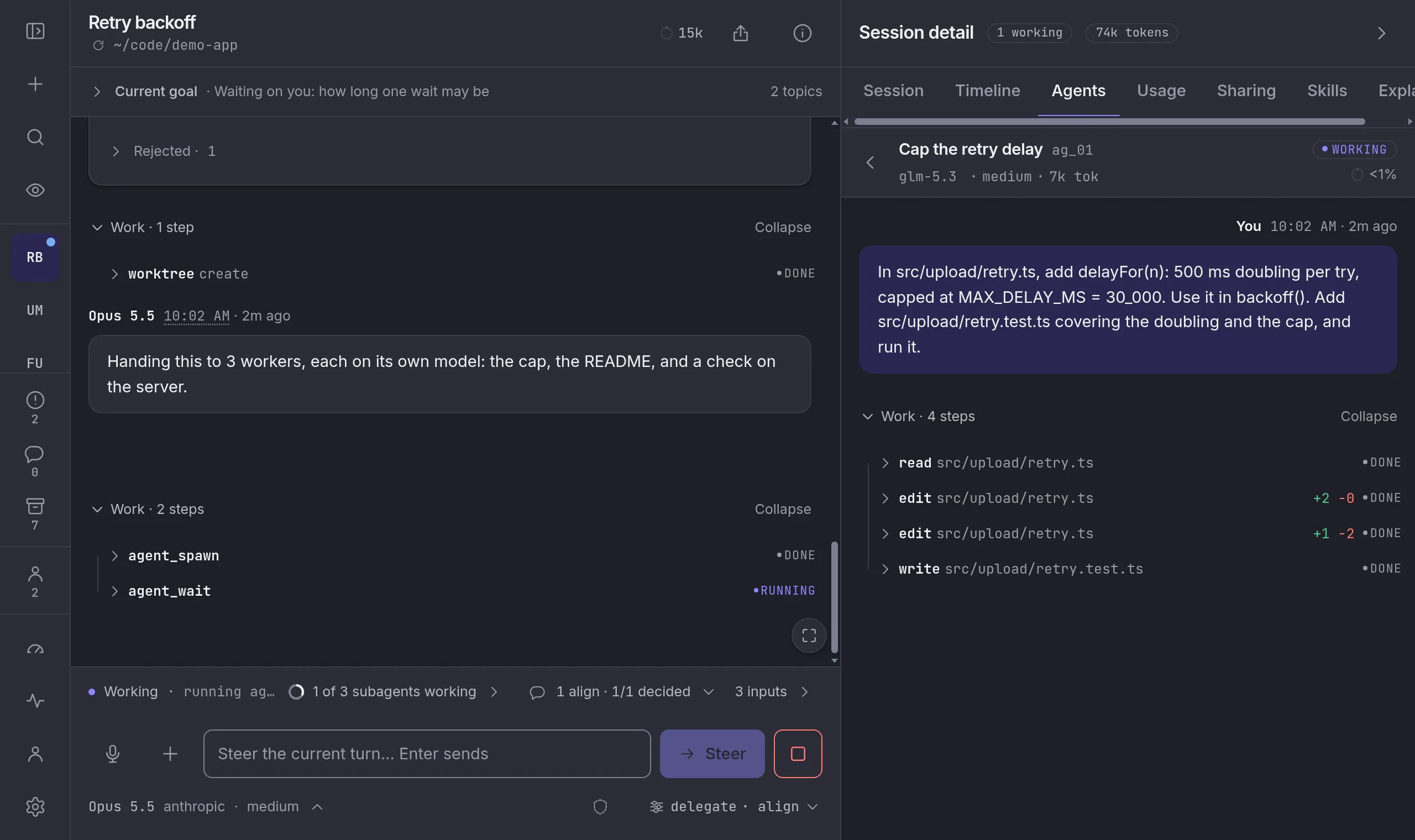
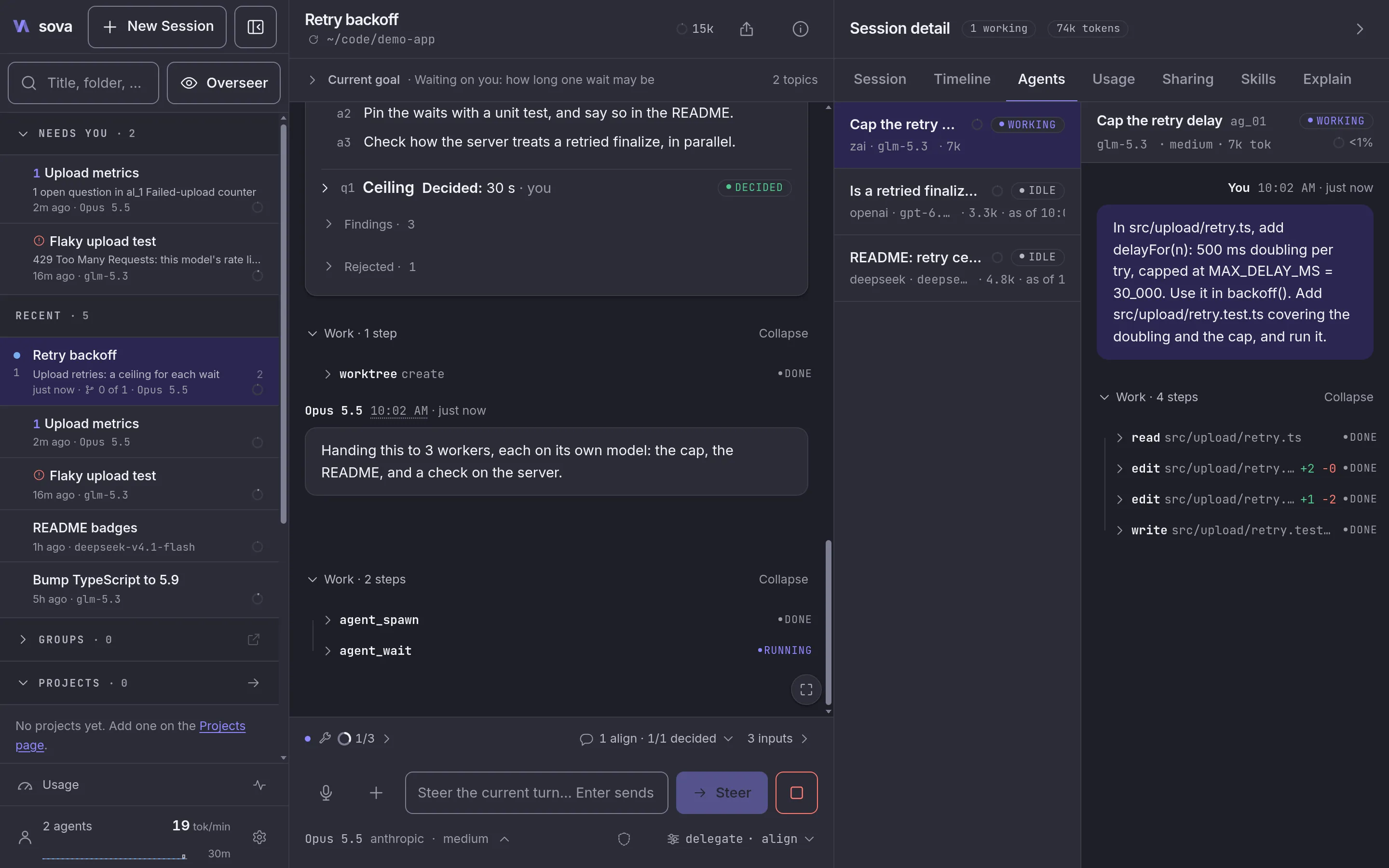
Sova on a desktop: the sessions sidebar with 2 sessions that need you, the Retry backoff session in Delegate mode waiting on its 3 workers, each on its own model, and the session detail pane's Agents tab with the working worker's transcript.
  1. Ask the Overseer about past work
  2. It finds the session by what was said
  3. Then ask what's waiting on you
  4. Every waiting session, and why it waits
  5. Open one: a drawing shows the problem
  6. Agree on the plan before work starts
  7. Your call, in one click
  8. Each worker runs on its own model
  9. Three models, one finished job
  10. Review every change as steps
  11. Each step with its reason
  12. Its timeline and summary at a glance
Your sessions, read in place
~/.pi/agent
Loopback by default
127.0.0.1:4800
One token per install
sova/auth-token
Open source
Apache-2.0
Off the desk

Not chained to your desk.

Sova is one web app at every width: pair your phone once by scanning a one-use QR code, install it to the Home Screen, and a session that needs you reaches your lock screen. Folded or open, the same session follows you.

What you get

More work, less window switching.

For people who already run coding agents. Your pi sessions, logins, and extensions come with you.

01 Delegate

Hand the work to subagents. Follow every one.

In Delegate, a session's agent becomes an orchestrator: it sends each kind of work to the model you routed it to. Every worker opens in the side pane with its own transcript.

The shipped routes use Claude Code models, so install the claude CLI or pick your own in Settings → Profiles.

Delegate docs

The Agents tab beside a Delegate session: 3 workers, each with its provider and model, its tokens and state, and the working worker's transcript: its task, a read, 2 edits and a new test file.
02 Alignments

Agree on the plan before anything gets built.

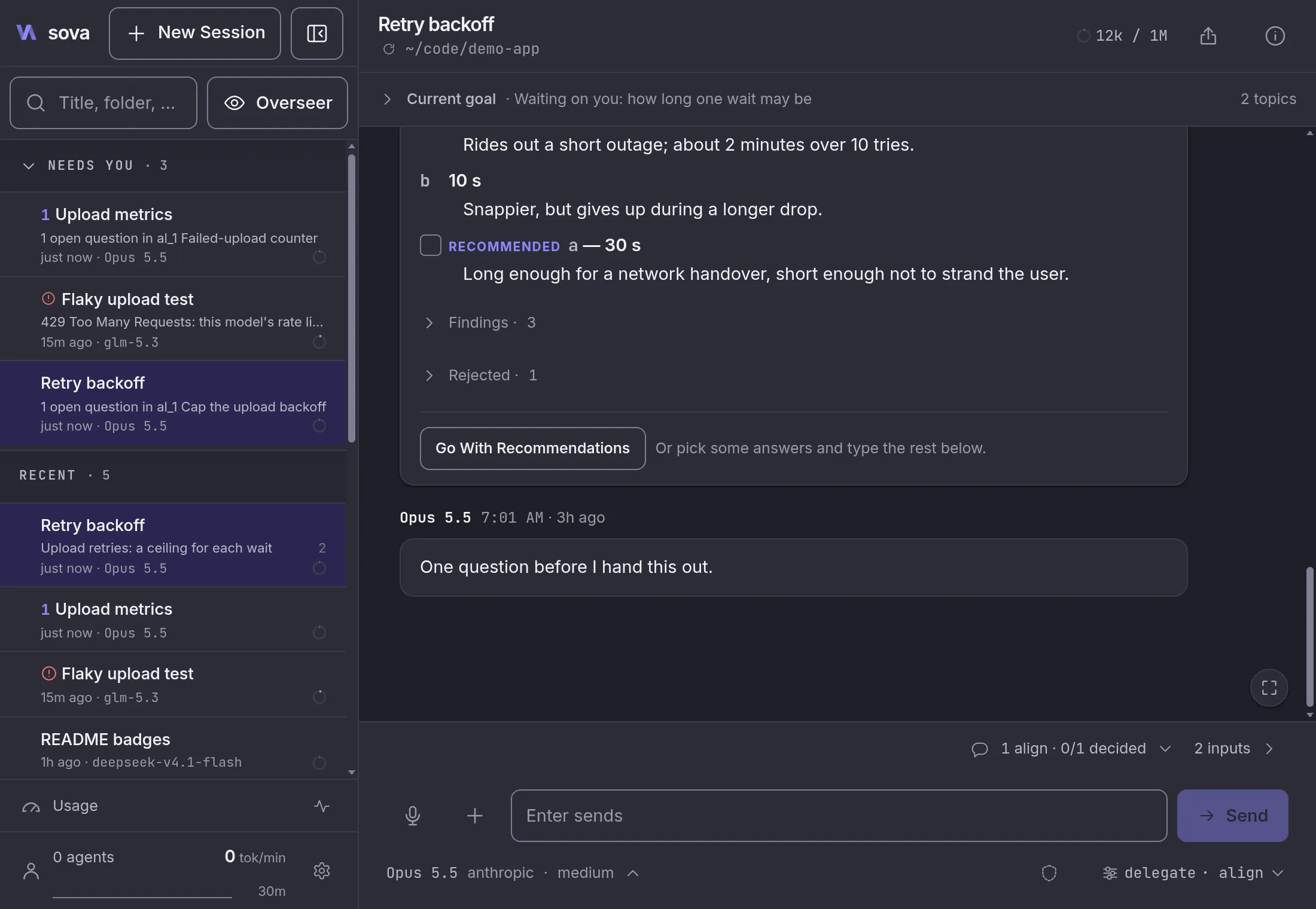
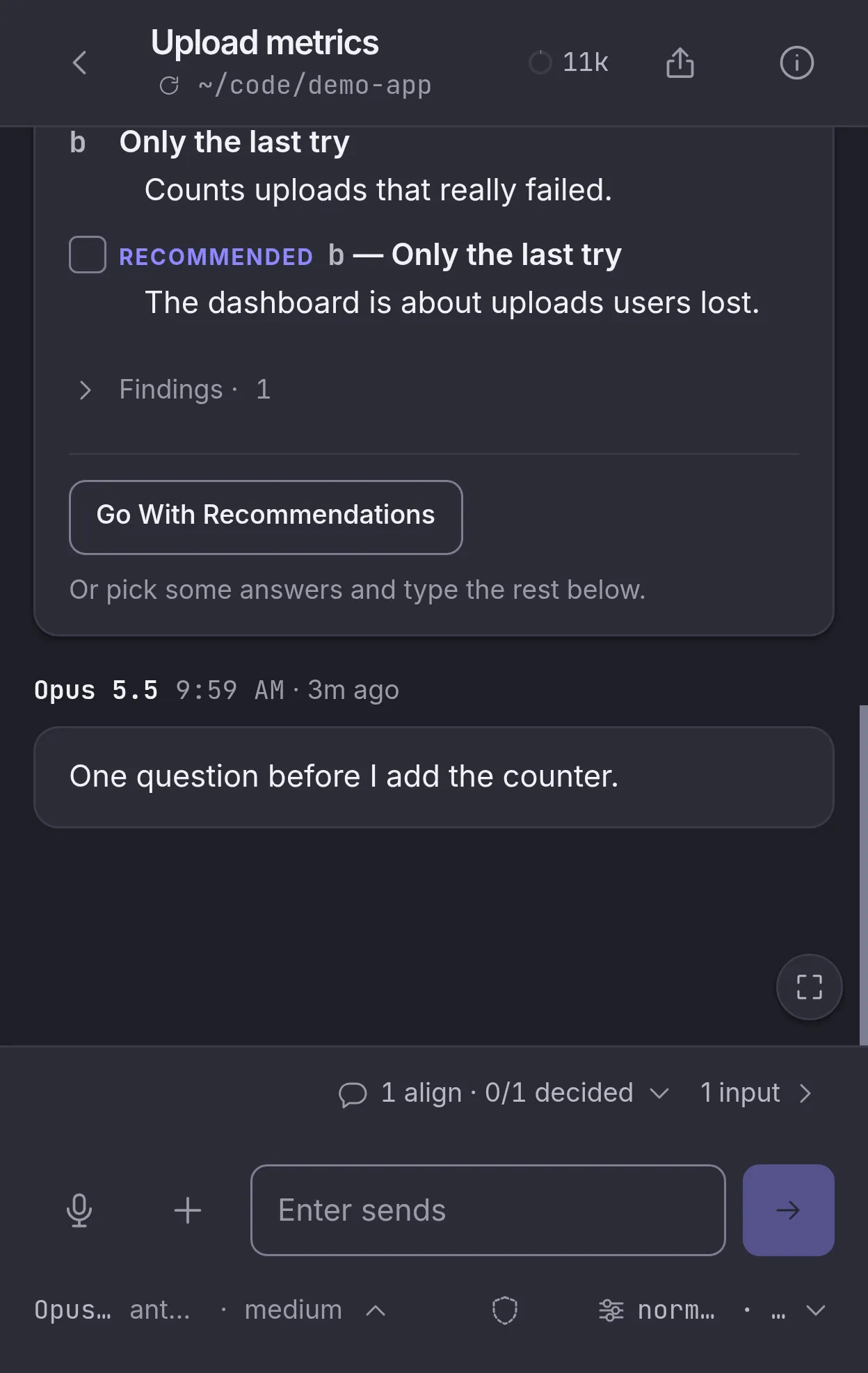
With align on, the agent works out what to build with you first, and records the approach, the alternatives it rejected, and its open questions, each with a recommendation. Answer with just “1a”.

Alignment docs

An alignment card in the chat: what the agent found, its approach, a rejected alternative, and an open question with 2 options and a recommendation.
03 Worktrees and changes

Review every change as steps.

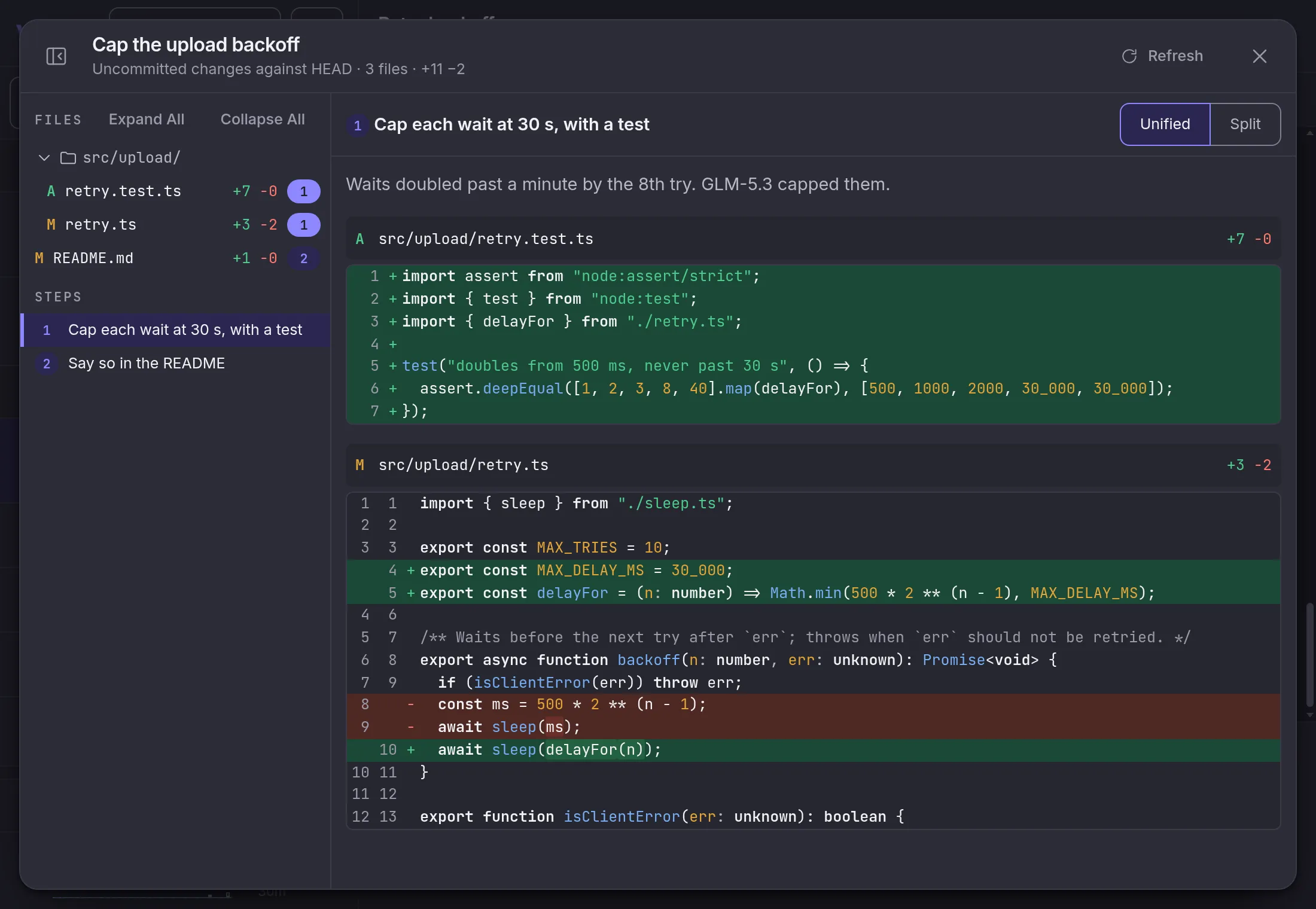
Ask what changed and the agent lays it out as numbered steps, each with a line on why, and no hunk left out. A session also keeps track of the git worktrees it works in.

The changes viewer only reads, and Sova never removes a worktree of yours on its own.

Worktrees and changes docs

The changes viewer: 2 numbered steps, one per worker that changed code, each with why it was made, and the first step's diff: the 30 s cap and its test.
04 Needs you

Know which session needs you, even away from the desk.

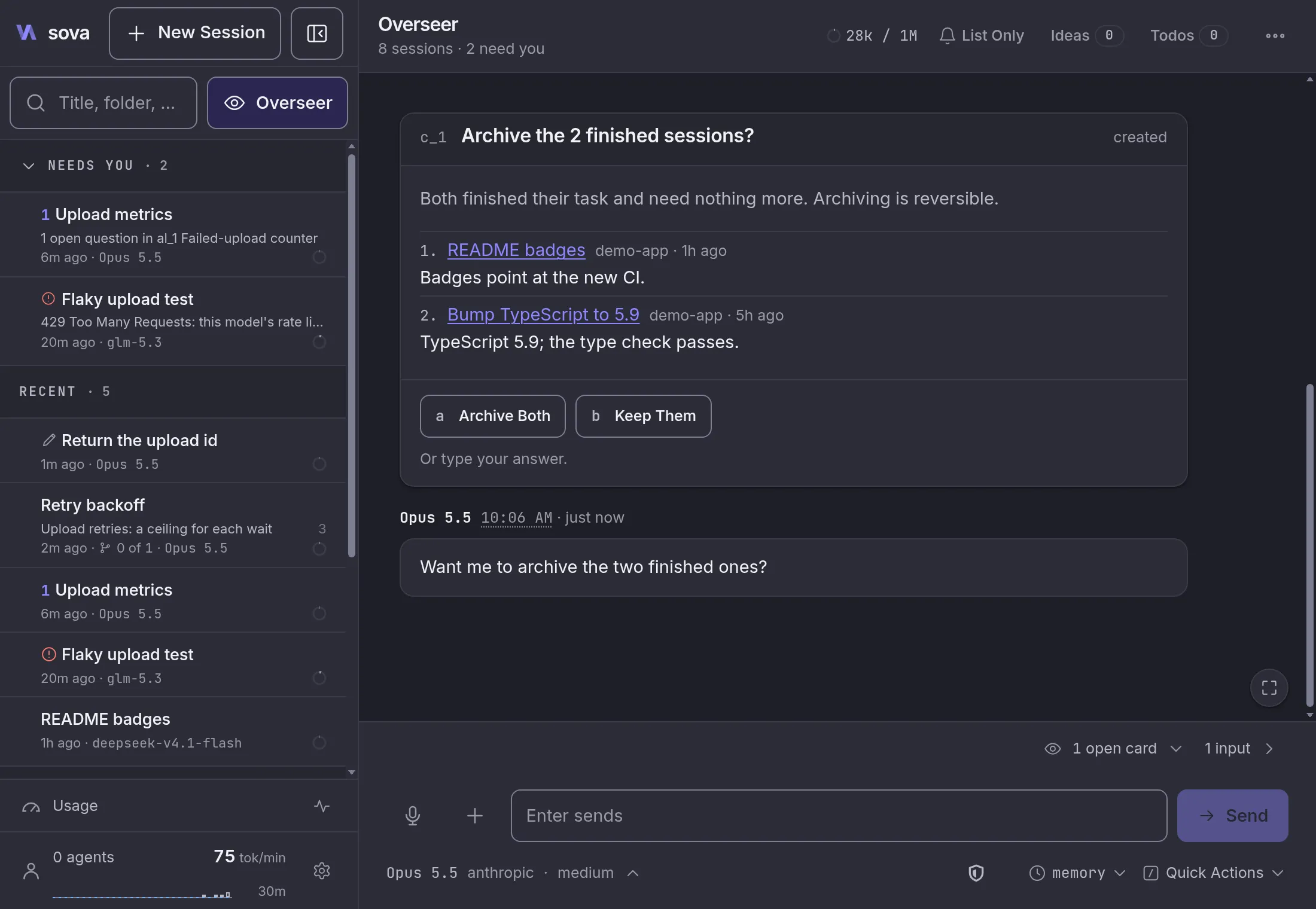
The Needs you list shows every session waiting on you: a question, an error, a failed worker. The Overseer, a session that reads all the others, can tell you what needs you, start sessions, or send them prompts.

The list costs no tokens. The Overseer has no shell, and writes files only when you ask.

Needs you docs Overseer docs

The Overseer page after asking what needs you: a card that lists 2 finished sessions, each with why, and asks before archiving them.
05 On your phone

Check in from your phone.

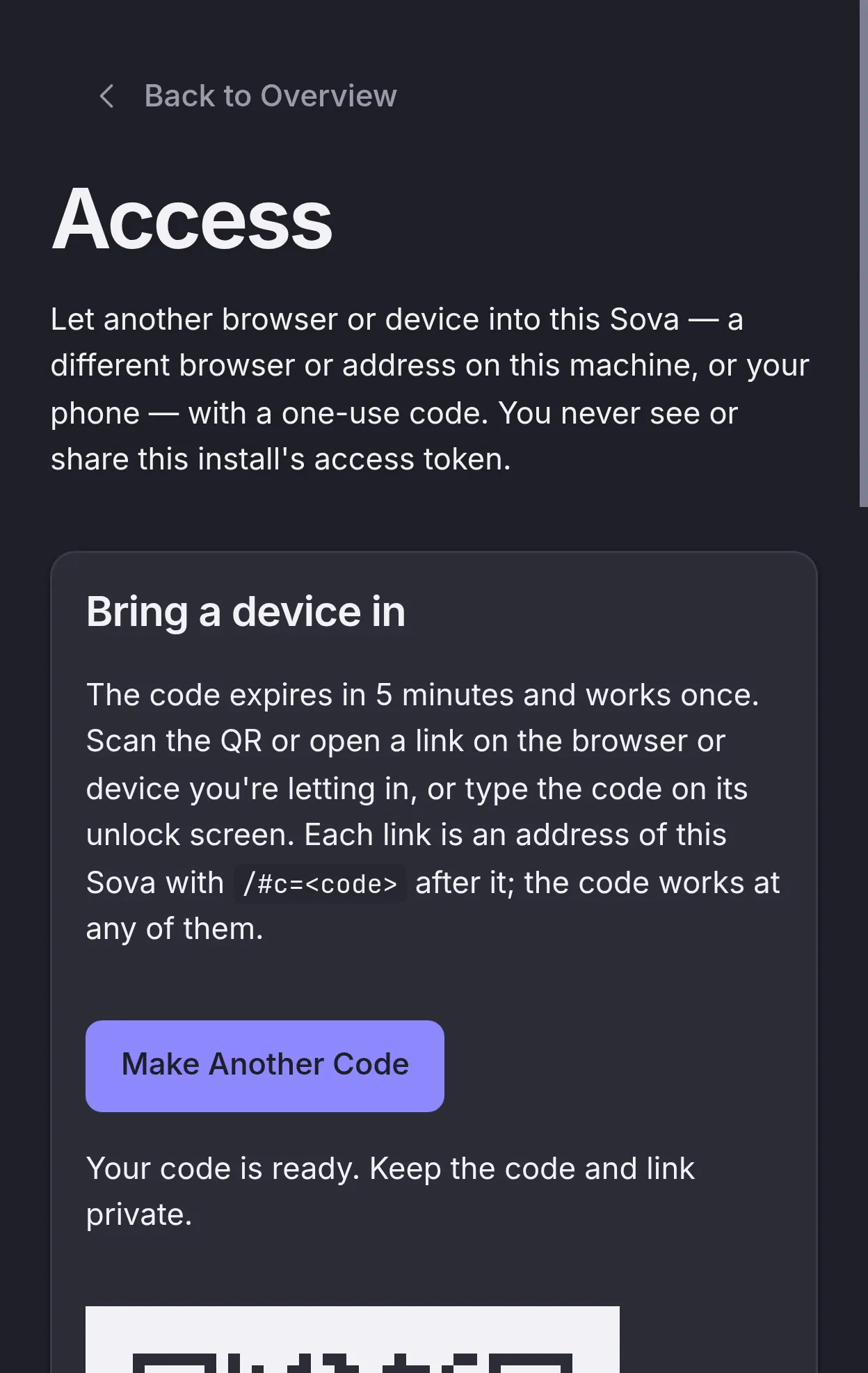
Pair once by scanning a one-use QR code, then answer a question, steer a turn, or start a session. With notifications on, a session that needs you reaches your lock screen.

Sova listens on 127.0.0.1. For a phone to reach it, use tailscale serve or your own HTTPS proxy. On iPhone, add Sova to the Home Screen for notifications.

Phone docs

The Access page on a phone: a one-use pairing code, its QR and the link to open it.
A session on a phone, waiting on an open question with 2 options and a recommendation.
Teams

Ask for a team. It works things out between its members.

Tell the agent to have a team build it, and it starts one: a shared objective, one role per member, and who owns which files.

Team inbox

Every member has an inbox. Nothing gets lost.

A message to a busy teammate waits in its inbox instead of failing; an urgent one reaches it at its next step, and an idle one wakes it within seconds.

Members close what they handle. In the side pane, beside each member's transcript, you can read its inbox: who sent what, and what's still open.

Every team gets a coordinator and a monitor, on the models your profile's Teams section names, else your chat's own; that's 2 more workers than you name. File ownership is a plan, not a lock: members share one folder.

Teams docs Delegate docs

An illustration of a team at work. On the left, its roster: a coordinator, three members named api, web and checker, each owning one folder, and a monitor. On the right, the team's messages: web asks api whether the order total is in cents, and api answers; checker tells api that 2 refund tests fail, and api fixes them and asks for another run; the monitor sends the coordinator an urgent notice that api is at 78% of its context; and the coordinator reports a milestone to your chat.
  • Members talk to each other

    By role, straight to a teammate. The web member asks the API member what a field returns; the checker sends failures back to the builder until they pass. None of it waits on your chat.

  • A coordinator, one voice back

    It builds nothing. It sees every member's assignment, steers them by role and answers their questions. It's the only member that talks to your chat, with milestones and the questions only you can answer.

  • A monitor on a timer

    It reads each member's context and your provider usage. A member near its context limit is told to wrap up and hand over to a successor; at a usage limit the team pauses, and resumes after the reset.

Merge queue and releases

Branches land one at a time, as they were tested.

Each project gets a merge queue. Nothing reaches its main branch until you say so, and what lands is exactly the commit that passed.

  1. 01You approve it

    Press Land, or type “land it” in the branch's own chat. Only your own word counts.

  2. 02Merged in a copy

    Onto the newest main branch, in a copy beside the project, never in your folders.

  3. 03Checked

    The project's checks run on that merge, plus any the merge thread picks for what changed.

  4. 04Landed as tested

    The main branch moves to exactly the commit that passed, then it's pushed.

Merge queue

One queue per project, one branch at a time.

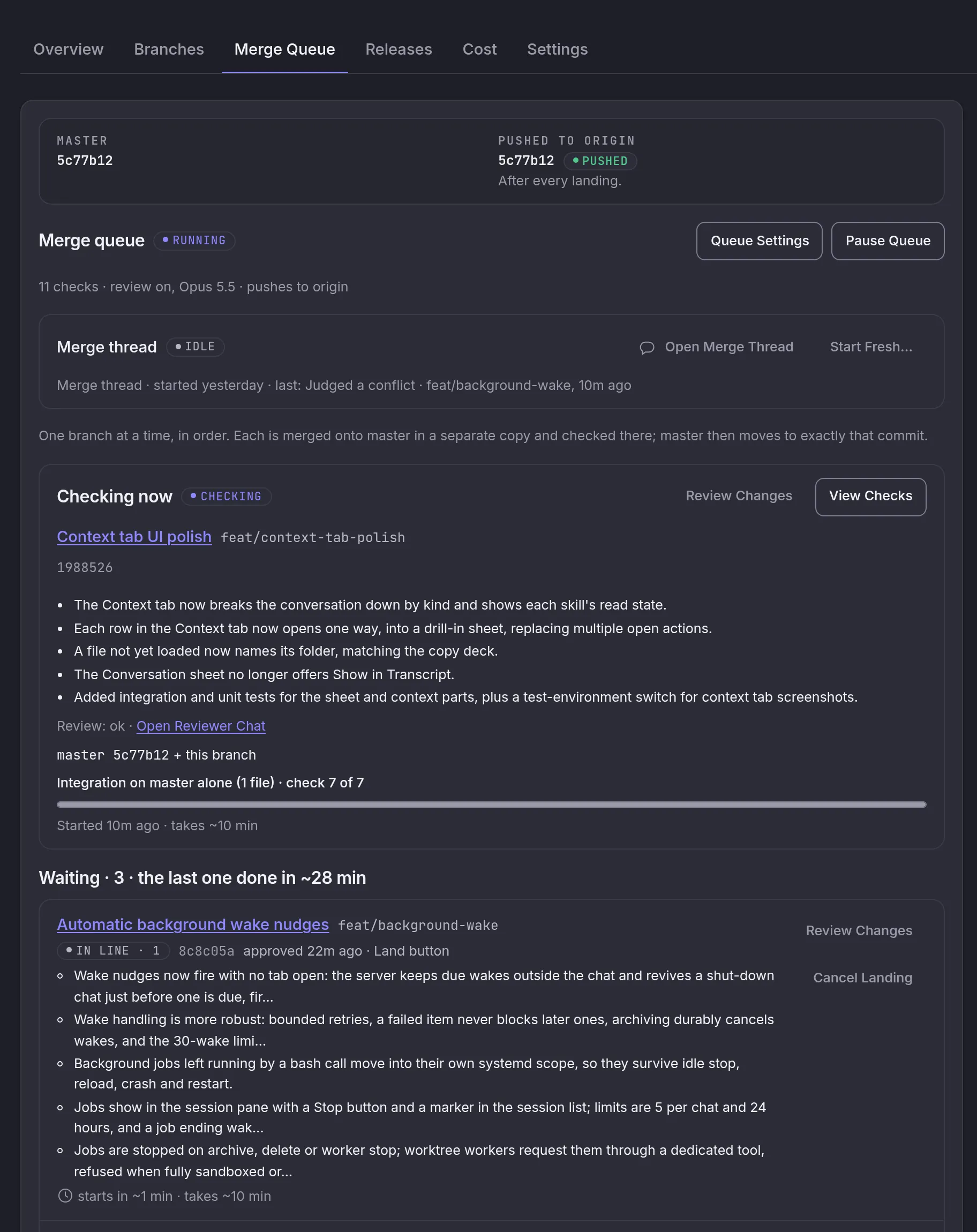
The project's Merge Queue tab shows what is being checked now, the branches waiting in line, and the recent landings. A red check counts against the branch only once the same check has passed on the main branch alone.

The merge thread, a chat of the queue's own, notes each landing, picks extra tests and judges conflicts. It never moves the main branch itself.

A project joins the queue once you set up its checks, with Set Up with a Chat on its Merge Queue tab. It can land by pull or merge request instead.

Merge queue docs Its settings

A project's Merge Queue tab: master and origin in step, the queue running with its merge thread idle, one branch being checked with its plain-words summary, and the branches queued behind it.
Releases

Cut a release. Publish when you say so.

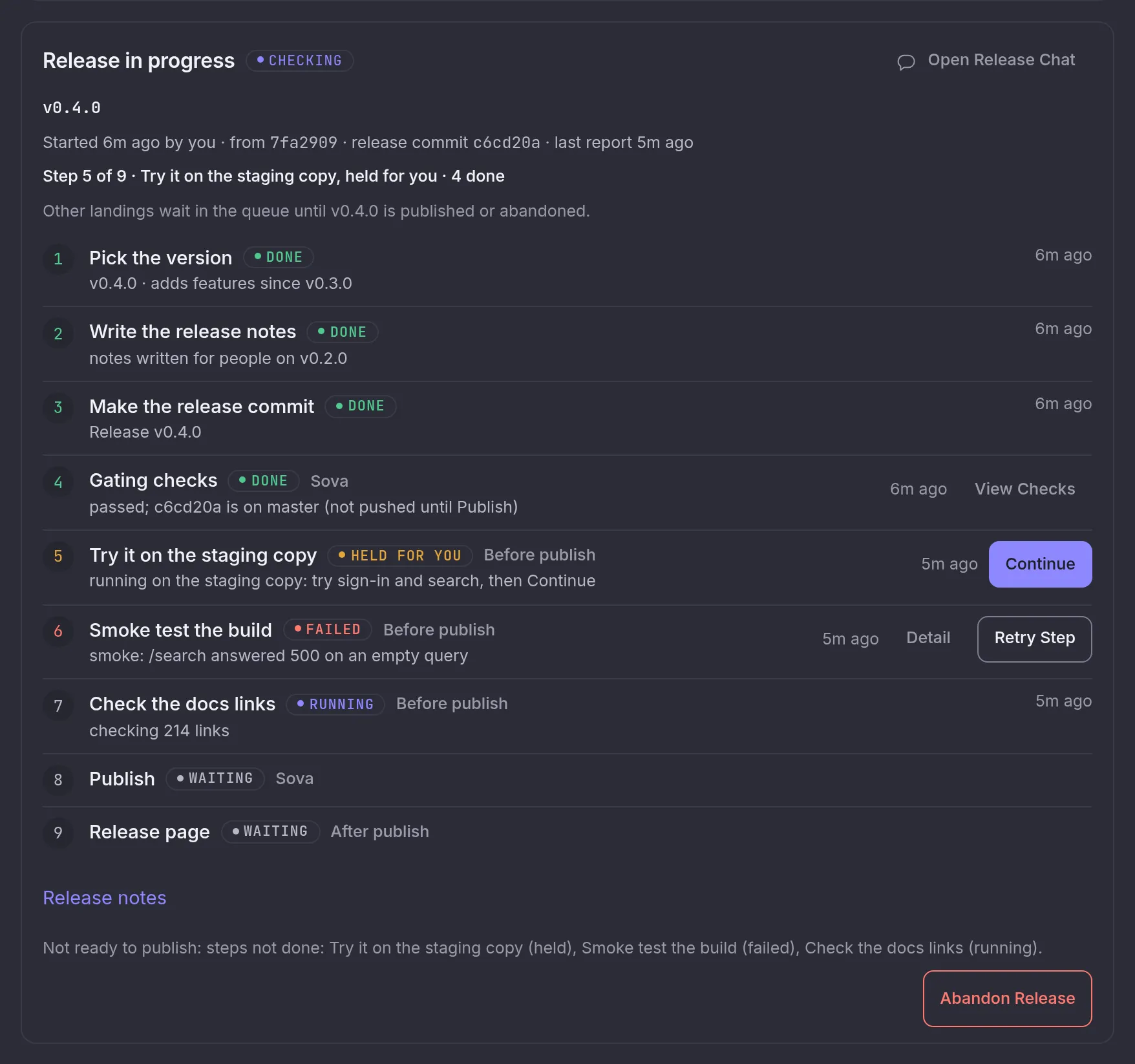
Start Release opens a chat that follows the project's release playbook: it picks the version, writes the notes and makes the release commit. The queue holds every other branch while it runs, the release checks run on its commit, and a held step, such as trying it on your live server, waits for your Continue.

Publish tags the release, moves its channel and pushes them to origin in one step, or changes nothing.

Off until you set them up (Set Up with a Chat on the Releases tab). A numbered tag is never moved or deleted; Withdraw moves only the channel back.

Releases docs Release settings

A release in progress, step by step: the version, notes and release commit done, the gating checks passed, Try it on the staging copy held for you with Continue, a failed smoke test with Retry Step, a check still running, and Publish waiting its turn.
Usage and costs

See what your agents spend.

Sova records every model call on this computer once, when it ends, and prices it at each provider's API prices. Beside that, each subscription's limits and how fast you're using them.

Costs

Every call, by model, project and day.

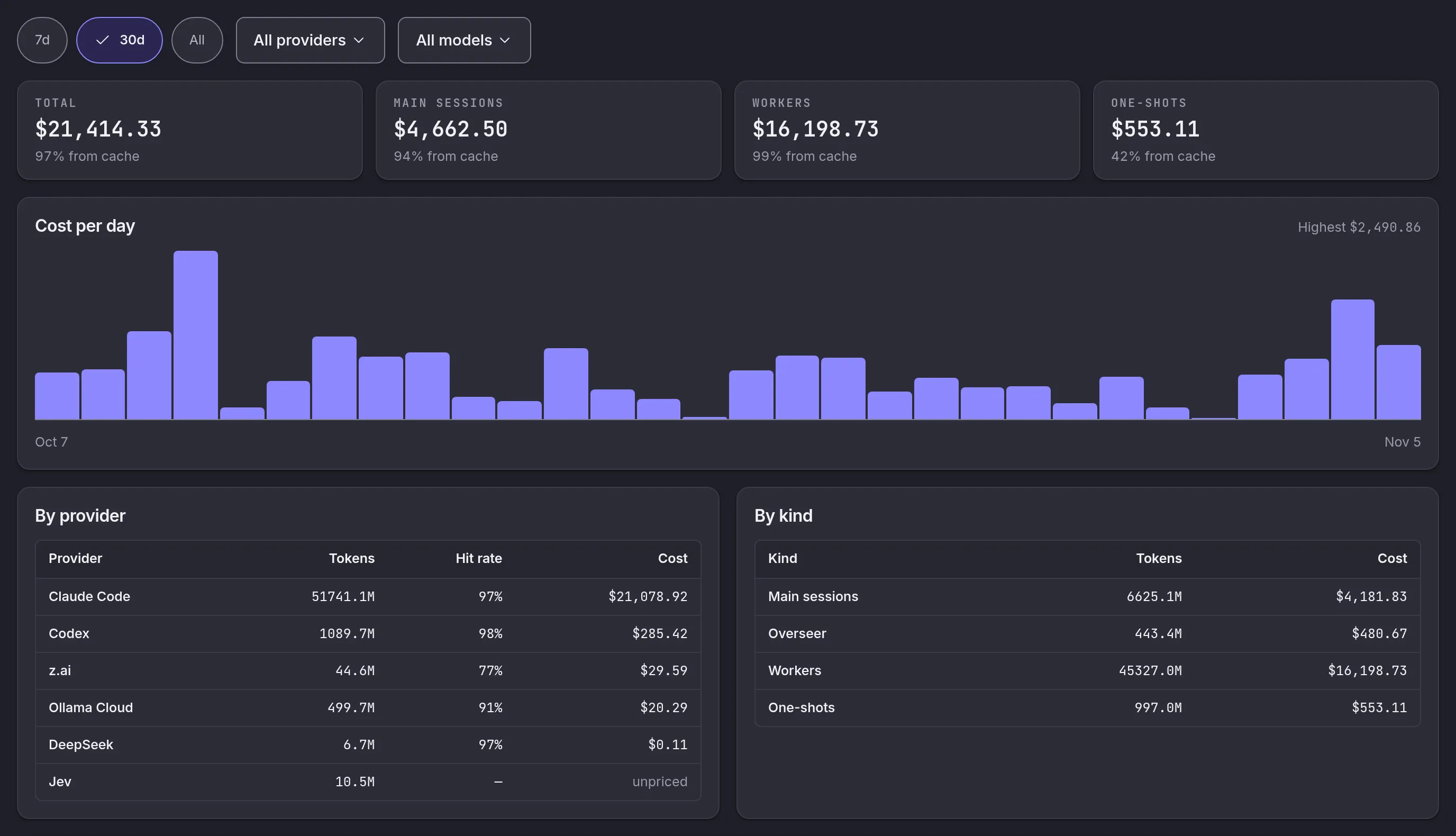
The Agents page's Costs tab splits the total into your main sessions, their workers and one-shot side calls, each with its cache hit rate. Below it: the cost per day, and tables by provider, model, kind and project, then the costliest sessions. Pick 7 days, 30 days or all of it, and filter by provider or model.

A project's Cost tab shows what its sessions cost and who started them. A session's Usage tab shows its own spend, its workers' included.

These are API prices, not your bill: subscriptions bill differently. Each computer counts its own calls.

Usage and costs docs

The Agents page's Costs tab over the last 30 days: the total and its split into main sessions, workers and one-shots, each with its cache hit rate, the cost per day, and tokens, hit rate and cost by provider and by kind.
Subscription limits

Know when a limit runs out, before it does.

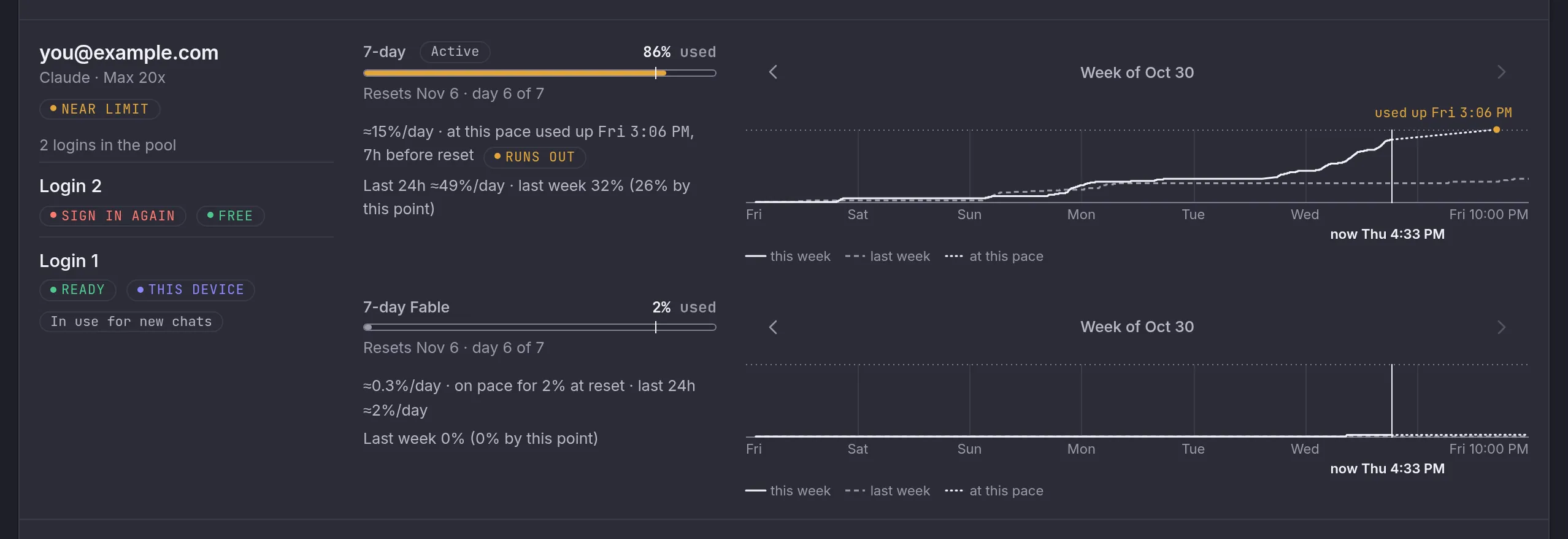
The Usage page shows each provider's windows: how much is used and when it resets. Sova keeps a history, so it can say your pace per day, when the window runs out at that pace, and where you were at this point last week.

Claude, OpenAI, Ollama Cloud, Z.ai and DeepSeek each get a card, with every login of a Claude account together. The foot of the session list keeps a glance of the same bars.

The percentages are the provider's own, read on this computer and refreshed every few minutes.

Subscription limits

One Claude account on the Usage page: each 7-day window's share used, when it resets, the pace per day and when it runs out at that pace, last week for comparison, the week's burn chart, and the account's logins.
And the rest

Small things that add up.

  • Rewind, regenerate, fork, steer

    Rewind to before any message you sent, regenerate or fork from a reply, steer a running turn without stopping it, or switch models mid-session. The context you built stays.

    Changing direction, in the docs

  • Claude logins, with failover

    Use Claude Code's models in chat and in workers, across several logins. A session or worker that hits a usage limit moves on to the next one.

    Needs the claude CLI installed and logged in.

  • A sandbox per session

    On runs a session's bash in an OS sandbox and checks file tools against the same policy. The default keeps a worker in a worktree writing only there and in its chat's shared folder.

    It contains an agent's mistakes, not hostile code, and it hasn't been audited.

  • Playbooks and schedules

    Markdown recipes an agent runs against a project, picked from the composer or run on a schedule. Sova ships 3.

    A schedule fires only after you approve it.

  • Share a session

    A read-only link to a session or part of it, as a snapshot or live. You see who opened each one.

    Public through a free Cloudflare tunnel once you press Turn On, or an address you set up (how). Recipients need no account.

  • And more

    Voice input, tools on your SSH or Docker targets, usage and load pages, and model rules.

    More in Customization

Beyond one machine Preview

More hosts, more people.

Each needs setup beyond the install.

Make it yours

18 themes. Yours is 1 JSON file.

Pick one in Settings → Themes, or save your own in ~/.pi/agent/sova/themes/. No rebuild, no restart.

// ~/.pi/agent/sova/themes/desk-lamp.json
{
  "name": "Desk Lamp",
  "extends": "dark",
  "vars": { "amber": "#ffb454" },
  "colors": {
    "accent": "$amber",
    "accent-tint": "#3a2f1c"
  }
}
  • Darkdark
  • Lightlight
  • Catppuccin Frappédark
  • Catppuccin Lattelight
  • Catppuccin Macchiatodark
  • Catppuccin Mochadark
  • Draculadark
  • Monokai Classicdark
  • Monokai Machinedark
  • Monokai Prodark
  • Monokai Ristrettodark
  • Nord Auroradark
  • Nord Classicdark
  • Nord Frostdark
  • Nord Lightlight
  • Tokyo Night Daylight
  • Tokyo Night Moondark
  • Tokyo Night Stormdark
How it works

A server, and a process for every chat, on your machine.

A server and a web app, plus a process per chat that runs the pi coding agent. Chats use pi's own agent directory: your sessions, logins, and extensions. Each new chat keeps its files in a folder of its own, in a Chats folder you can move.

Your browser

The desktop workspace, or the folded layout installed on a phone.

sova server

Hono, on 127.0.0.1:4800 by default.

  • starts and reconnects chats
  • lists and reads sessions
  • checks the install's token

Chat processes

One per chat, on Bun, running pi through its SDK. Restarting Sova stops none of them, and each moves to new code between replies.

  • each chat and worker
  • the Overseer
  • pi extensions

~/.pi/agent

pi's agent directory. Sova's own state lives in sova/; new chats live in the Chats folder (Settings → General).

  • sessions/
  • auth.json
  • extensions/
  • sova/
Model requests go from each chat's process to your configured provider. Tools and extensions may use the network too.

What it touches.

  • Not a hosted service. It runs on your machine.
  • Not a team app. One person runs it; others reach only what you share with them.
Install
~/.local/share/sova and a ~/.local/bin/sova launcher. No sudo, no system packages, no shell-profile edits, no settings.
App entry
A Sova entry in your app launcher that runs sova app: sova.desktop and its icon on Linux, ~/Applications/Sova.app on macOS. Its window keeps a browser profile of its own, in ~/.config/sova-browser (macOS: ~/Library/Application Support/sova-browser). --no-app-entry skips the entry.
pi extensions
One link per Sova extension in ~/.pi/agent/extensions/. --no-extensions skips this.
Chats
Each runs as a background process of its own, a user service on Linux where one is available and a detached process elsewhere. Stopping the server doesn't stop them; each exits once it has been idle for 30 minutes.
Git upkeep
Git's own scheduled maintenance, turned on for each project's repository, with git's timers started once per machine. Sova records what it set and puts it back when a project goes. SOVA_GIT_MAINTENANCE=off skips it.
Login service
Only if you say yes, or pass --service.
Access
Loopback by default, and one token per install. Delete ~/.pi/agent/sova/auth-token and restart to sign every browser out.
Off by default
The share listener and Mesh, until you set them up.
Run your next pi session here.

Sessions you already have show up as soon as it starts.

curl -fsSL https://raw.githubusercontent.com/Naomarik/sova/stable/scripts/install.sh | bash

Then run sova, and sova open.

Open source

Apache-2.0, built in the open.

TypeScript end to end: a SolidJS web app, a Hono server, and a process per chat running the pi SDK. Read the code, file an issue, or run a checkout.

# Run a checkout: Git, Node.js ≥22.19, pnpm, and Bun 1.4.2
git clone https://github.com/Naomarik/sova.git
cd sova
pnpm install --frozen-lockfile
pnpm run build
pnpm start   # http://127.0.0.1:4800, on Bun
pnpm start --node   # server only, on Node: no chats